For the technical details of key formats and license storage see docs_licenses/README_LICENSES and docs_license_manager/README_LICENSE_MANAGER. At any time you can check your license in the app under Settings → Help → Active License (see §5).
Chapter 1: Which Tier Do You Need?
| Standard | Professional | Enterprise | |
|---|---|---|---|
| Full visuals, styles, masks, playlists | Yes | Yes | Yes |
| DMX lighting + scenes + simulator | Yes | Yes | Yes |
| MIDI / HID / OSC controllers | Yes | Yes | Yes |
| HTTP / WebSocket control API | Yes | Yes | Yes |
| Ableton Link + Timecode | — | Yes | Yes |
| MCP server (AI/automation control) | — | Yes | Yes |
| Spout2 / NDI output | — | 1 output each | Multi-output + layout editor |
| Phones that can be paired (mobile remote) | 1 | 2 | 5 |
| Support | Community | Standard | 3 assistance sessions per year while the subscription is active, 1-day email |
Rule of thumb: bedroom/small-bar DJ → Standard. Working DJ/VJ with Link, streaming or automation → Professional. AV company, multi-room installs, broadcast → Enterprise (multi-output NDI/Spout and the layout editor are the Enterprise-only features that matter on site).
Chapter 2: The Trial (First 14 Days)
- Starts automatically on first launch if no key is present. 14 days, unlimited launches.
- Evaluates the Standard tier only: Professional and Enterprise features show as locked, and the trial allows one paired phone.
- One trial per machine — once trial data exists (even expired), a new period cannot start.
- When it expires, the app locks until a valid key is entered. Your content (
Visuals/,config.json, scenes, mappings) is kept — nothing is deleted.
Chapter 3: Activating With A Key
- Open DjMirror Pulse. The startup Activation dialog offers 🔐 Activate Product License. (Later: Settings → Help → Active License shows status and details anytime.)
- Copy the shown
machineId(a hardware-derived ID, stable across app updates) and send it to your distributor. - You receive a signed key starting with
DJMP2-…(~138 chars). Paste it into the dialog → activated. Pre-edition 16-char keys (XXXX-XXXX-XXXX-XXXX) still unlock Professional.
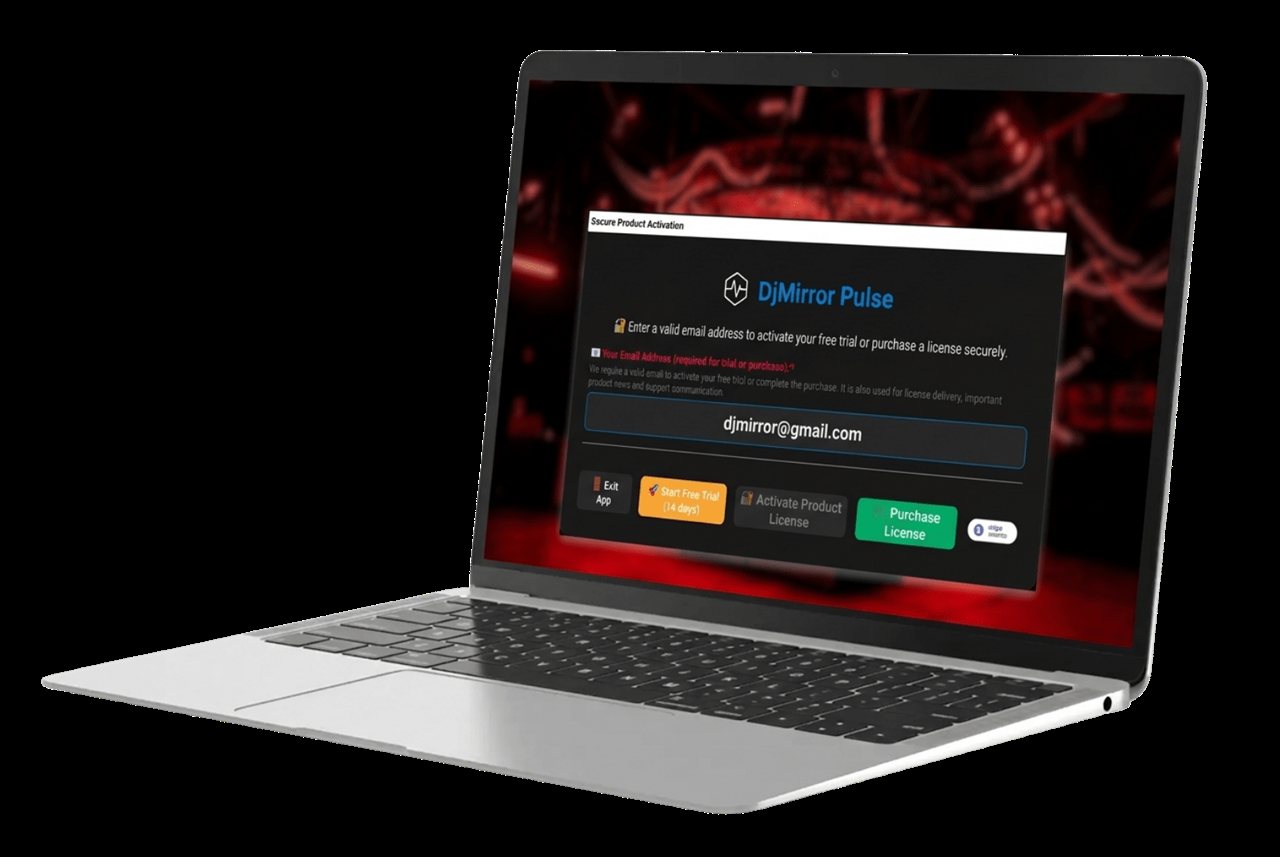 Figure 1: activation is a dialog, not a file.
4. Temporary/demo keys look like
Figure 1: activation is a dialog, not a file.
4. Temporary/demo keys look like TMP-XXXX-…-YYYYMMDD-XXXXXX with an embedded UTC expiry (max 92 days) —
same machine binding, they simply stop working after the date.
The key and distributor id are stored in the app settings (License/ActivationKey, License/DistributorId)
plus the EULA acceptance flag — no license files to copy or lose.
Chapter 4: Moving To Another Machine (Transfer)
Keys are bound to one machineId — a key from machine A never works on machine B. Transfer procedure:
- Install DjMirror Pulse on the new machine and copy its
machineIdfrom the Activation dialog. - Ask your distributor for a key for the new
machineId(quote the old one so they can retire it). - Activate on the new machine (§3). Copy your content over:
Documents/Visuals/(media, playlists, styles),dmx_fixtures/,dmx_scenes/,controllers/mappings andconfig.json. - Uninstall or deactivate the old machine to stay within your seat count.
For a practical checklist of what to export and copy, see Backup & Restore.
There is no self-service deactivation button in 6.9 — the distributor issues and retires keys. Keep your distributor's contact next to the key: you will need it for every hardware change (new laptop, new motherboard).
Chapter 5: Check What Your License Includes
In the app: open Settings → Help → Active License. The page lists:
| Line | Meaning |
|---|---|
| Edition and Status | Your tier (for example Enterprise) and whether it is activated |
| Activation key | Only the start and end of your key — enough to recognize it, not to copy it |
| Key type and Issued | permanent or temporary, and the date it was issued |
| Machine ID | The machineId this key is bound to — send it to your distributor for a new key |
| Distributor ID and Registered email | Who issued the key and the address it is registered to |
| Features that depend on the edition | A tick for each feature your edition includes: Ableton Link, Timecode, MCP server, Spout and NDI single and multiple outputs |
Warning
This page shows your Machine ID, distributor and e-mail. Do not post screenshots of it publicly.
From a script: GET /api/v1/capabilities returns a license block with the edition, whether it is active or a
trial, the trial days remaining and a true/false for each feature (abletonLink, timecode, mcpServer,
ndiOutput, ndiLayout, spoutOutput, spoutLayout). See the HTTP & WebSocket API guide.
Chapter 6: Troubleshooting
| Symptom | Likely cause | Fix |
|---|---|---|
| "Trial expired" on a new install | Trial data from a previous install on this machine | One trial per machine — enter a key; content is preserved |
| Key rejected | Key belongs to a different machineId, or typo in 138 chars |
Re-copy machineId; paste (don't retype) the full key |
| Pro features still locked after activating | Standard-tier key, or app not restarted | Check the tier in Help → Active License; restart the app; confirm with your distributor |
Mobile remote refuses a new phone (MOBILE_LIMIT_REACHED) |
You reached your tier's phone limit (1 / 1 / 2 / 5) | Unpair a phone you no longer use, or move to a higher tier |
| MCP, Link, Timecode, Spout or NDI is locked | The feature needs Professional or Enterprise | See the table in §1 |
| Temp key stopped working | Embedded expiry date passed (max 92 days) | Request a permanent or renewed key |
| New laptop, old key fails | Machine binding | New key for the new machineId (§4) |
| Where is my license file? | There is none | Keys live in app settings; back up config.json + content folders instead |
Chapter 7: Quick Recipe Card
- Try: launch → 14-day Standard trial, no key. Content safe at expiry.
- Buy: pick tier by §1 → send
machineId→ pasteDJMP2-…(~138 chars). - Check: Settings → Help → Active License, or
GET /api/v1/capabilities. - Move: new
machineId→ distributor issues new key → copyVisuals/, scenes, mappings,config.json. - Temp keys:
TMP-…-YYYYMMDD-…, expire automatically, max 92 days.